

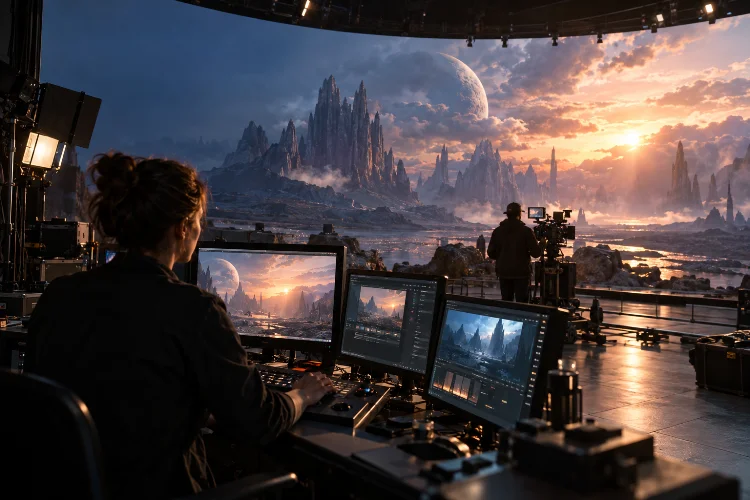
Imagine shooting a dramatic scene on an alien planet without leaving a production studio. The mountains look enormous, the sky changes color naturally, and your actors can actually see the environment surrounding them.
Even better, the director can adjust the lighting, move virtual objects, or change the background almost instantly.
That’s the power of real-time rendering.
As virtual production becomes increasingly important in filmmaking, understanding real-time rendering strategies for virtual film environments can help production teams achieve impressive visuals while maintaining better creative flexibility and production control.
Unlike traditional rendering workflows, where complex computer-generated images may require significant processing time, real-time technology generates interactive visuals quickly enough to support live production decisions.
Tools such as Unreal Engine, advanced graphics processing hardware, camera tracking systems, and LED volumes are changing how virtual sets are designed and photographed.
However, producing convincing digital environments isn’t simply about using powerful computers.
It requires careful planning, smart optimization, accurate lighting, and reliable technical coordination.
Let’s explore the practical rendering techniques that help filmmakers create immersive virtual worlds without sacrificing visual quality or production efficiency.
1. Understanding Real-Time Rendering in Virtual Production
Real-time rendering is the process of generating computer-generated images continuously, allowing scenes to respond immediately to changes in cameras, lighting, objects, and environmental conditions.
Instead of waiting for individual frames to finish processing offline, filmmakers can explore and modify digital environments interactively.
How Real-Time Rendering Changes Traditional Filmmaking
Traditional visual effects workflows often involve filming actors first and integrating digital backgrounds during post-production.
With real-time rendering, filmmakers can preview or capture virtual environments while principal photography is happening.
For example, actors performing inside an LED volume can see digital landscapes displayed on large surrounding screens.
When the physical camera moves, the rendered perspective changes accordingly, helping create a convincing sense of depth.
This technique is commonly known as in-camera visual effects, or ICVFX.
According to Epic Games’ In-Camera VFX documentation, this approach combines live camera tracking, LED lighting, and real-time rendering to integrate physical foreground elements with virtual backgrounds.
The goal is to capture more of the intended final image directly through the camera.
Why Rendering Performance Matters
A virtual environment must deliver consistent frames at the production’s required timing.
If rendering becomes unstable, the background may stutter, display artifacts, or fail to synchronize correctly with camera movements.
This can interrupt filming and create expensive technical problems.
The production team must therefore balance image quality, rendering speed, system latency, and stability.
A visually stunning environment isn’t particularly useful when it cannot run reliably during an actual shoot.
That’s why effective virtual production starts with defining technical limits before building increasingly complex scenes.
2. Choosing the Right Rendering Engine and Production Pipeline
Selecting the appropriate real-time engine is one of the earliest technical decisions in virtual filmmaking.
Different projects require different levels of visual realism, interactivity, rendering flexibility, and integration with production hardware.
Using Unreal Engine for Cinematic Environments
Unreal Engine is widely used in virtual production because it combines real-time 3D rendering with tools for cinematic lighting, animation, camera operation, and virtual environment management.
Its modern rendering features include Nanite virtualized geometry, Lumen global illumination, and Temporal Super Resolution.
Together, these technologies can help artists develop detailed scenes while managing computational demands.
Nanite supports highly detailed geometric assets, while Lumen provides dynamic indirect lighting and reflections.
Temporal Super Resolution can reconstruct higher-resolution images from lower-resolution rendering inputs, potentially reducing GPU workloads.
However, their usefulness depends on the scene, hardware, engine version, and production configuration.
Not every feature is automatically suitable for every LED stage.
Evaluating Other Rendering Solutions
Although Unreal Engine dominates many conversations about virtual production, it isn’t the only available option.
Unity’s High Definition Render Pipeline, for example, offers physically based lighting, advanced materials, and configurable rendering features for high-fidelity applications.
Other specialized rendering tools may be appropriate for animation, previs, broadcast, or interactive visualization.
The best choice depends on the technical requirements and existing expertise of the production team.
A smaller independent film might prioritize affordability and simplicity, while a complex science-fiction production may require sophisticated distributed rendering and camera tracking integration.
Build a Connected Workflow Early
A reliable rendering pipeline should connect environment design, asset creation, lighting, camera tracking, color management, and final image output.
Teams commonly exchange assets between digital content creation tools and real-time engines using established formats and interchange workflows.
Standardize naming conventions, coordinate systems, measurement scales, and software versions before major production begins.
Otherwise, inconsistencies between departments can create frustrating delays.
Most importantly, test the entire workflow using a representative scene before committing to a major virtual production schedule.
3. Optimizing 3D Assets for Smooth Rendering Performance
Detailed digital environments can quickly overwhelm graphics hardware.
A virtual city may contain thousands of buildings, complex materials, moving vehicles, animated characters, and atmospheric effects.
Without optimization, even powerful rendering systems can struggle.
Manage Geometry Without Losing Visual Quality
Geometry optimization involves controlling how much three-dimensional detail must be processed and displayed.
Traditional techniques include reducing unnecessary polygons, using levels of detail, and removing objects that aren’t visible to the camera.
Nanite introduces a more automated approach to managing highly detailed geometry.
According to Epic Games’ Nanite documentation, the system processes detailed geometry using a specialized representation designed to render only the detail needed for the displayed image.
However, Nanite doesn’t eliminate the cost of lighting, materials, animation, or every type of geometry.
Complex translucent objects, demanding shaders, and other rendering features may still become bottlenecks.
Optimize Textures and Materials
Textures often consume substantial graphics memory, particularly when environments contain numerous high-resolution surfaces.
A distant mountain doesn’t necessarily require the same texture detail as a foreground object positioned directly behind an actor.
Use appropriate texture resolutions, mipmaps, compression, and streaming systems to reduce unnecessary memory consumption.
Materials deserve similar attention.
A complicated shader containing numerous texture samples and expensive visual calculations may look impressive but slow down the entire scene.
Simpler material setups can often produce equally convincing results when viewed through the production camera.
For example, an enormous virtual desert might use carefully optimized terrain materials while reserving additional detail for rocks and structures close to the camera.
The goal is to place processing power where audiences will actually notice it.
Design Around the Camera Frustum
One of the smartest optimization strategies is prioritizing what the camera can see.
A virtual environment doesn’t always need to be equally detailed in every direction.
If a sequence focuses on a spacecraft cockpit looking toward a distant planet, the visible background may deserve significantly more attention than unseen sections of the digital set.
Camera-aware optimization becomes especially valuable when constructing large virtual enviroments.
By concentrating detail inside the relevant viewing area, artists can preserve visual quality without unnecessarily increasing rendering costs.
4. Creating Realistic Lighting and Reflections in Real Time
Lighting is one of the strongest indicators of whether a virtual environment feels believable.
Even a beautifully modeled digital landscape can look artificial when shadows, reflections, and color interactions don’t match the physical scene.
Use Dynamic Global Illumination Carefully
Global illumination describes how light interacts with surrounding surfaces after its initial contact.
For example, sunlight entering a room may bounce off a red wall and subtly influence the color of nearby objects.
Unreal Engine’s Lumen system supports dynamic indirect lighting and reflections, allowing many lighting changes to appear interactively.
This is particularly valuable when directors want to experiment with different times of day or modify virtual lighting during production.
However, more sophisticated lighting calculations generally require additional rendering resources.
A practical strategy is to establish a visual quality target and test whether the chosen lighting system can sustain the required performance.
Some productions may benefit from combining simpler illumination techniques with carefully controlled practical lighting.
Match Digital and Physical Lighting
In LED volume production, virtual backgrounds and physical actors must appear to inhabit the same lighting environment.
Suppose a scene takes place during a vivid orange sunset.
The digital sky might look convincing, but the illusion breaks if the actor is illuminated by cool white studio lights.
The cinematography team must coordinate physical fixtures with the lighting suggested by the virtual scene.
LED walls can contribute useful ambient color and reflections, but they cannot always replace dedicated film lighting equipment.
Additional fixtures may be needed to reproduce directional sunlight, sharp shadows, or controlled highlights.
Control Reflections and Color Consistency
Reflective objects make lighting mismatches particularly obvious.
A metallic helmet, glass window, or polished vehicle can reveal unexpected LED patterns or inconsistent lighting directions.
Test important reflective surfaces with the actual camera, lens, and stage configuration.
Color management is equally essential.
OpenColorIO provides a framework for maintaining consistent color transformations across compatible production applications.
Using an agreed color pipeline helps prevent unexpected differences between artist monitors, rendering systems, LED displays, and recorded camera footage.
5. Integrating Camera Tracking and LED Volume Rendering
An immersive LED background only becomes convincing when it responds correctly to the physical camera.
That’s where camera tracking, projection accuracy, and display synchronization become essential.
Synchronize Physical and Virtual Camera Movement
Camera tracking systems measure the position and orientation of a physical camera.
Those measurements are transmitted to the rendering engine, which updates the digital viewpoint.
When the operator moves left, the background perspective must change naturally.
This creates parallax, allowing virtual objects at different distances to appear to move relative to one another.
However, camera tracking requires accurate calibration.
The system must account for camera position, lens characteristics, sensor dimensions, tracking offsets, and potentially lens distortion.
Even a small discrepancy can make the virtual world appear disconnected from the physical set.
For complex shoots, establish a repeatable camera calibaration procedure before filming begins.
Understand Inner and Outer Frustum Rendering
In many LED volume workflows, the rendering system separates the camera-visible area from the surrounding display content.
The inner frustum represents the region rendered specifically for the tracked production camera.
The outer frustum covers the remaining LED surfaces, which may provide environmental imagery and lighting contributions.
This distinction helps allocate rendering resources to the area that matters most for the final shot.
Epic Games’ nDisplay system supports multi-display configurations and coordinated rendering across multiple machines.
These capabilities allow production teams to manage complex LED wall arrangements while maintaining the appropriate camera perspective.
Reduce Latency and Synchronization Problems
Latency is the delay between a physical action and the corresponding visual response.
Excessive delay can make background movement appear disconnected from camera movement.
Meanwhile, synchronization errors can produce tearing, mismatched frames, or visible seams between LED sections.
Professional workflows often use timecode, genlock, and frame synchronization to keep cameras, processors, and rendering hardware coordinated.
Rather than assuming the equipment will work perfectly, test real camera movements at the intended frame rate.
Fast pans, sudden tracking movements, and challenging lens settings can reveal problems that remain invisible during simple stationary tests.
6. Monitoring Frame Rates, GPU Workloads, and Rendering Bottlenecks
One of the biggest misunderstandings about real-time rendering is that higher visual quality always requires faster hardware.
Sometimes, the better solution is identifying a poorly optimized effect or unnecessary rendering operation.
Establish a Frame-Time Budget
Frame time measures how long the system takes to produce an individual image.
A production shooting at 24 frames per second has approximately 41.7 milliseconds per frame, although practical performance requirements depend on the complete display and synchronization pipeline.
Rendering tasks must operate within the available processing budget.
If expensive reflections, complex shadows, and dense geometry consume too much time, the system may miss its performance target.
A reliable production therefore requires performance headroom rather than operating continuously at the hardware’s limits.
Profile Before Making Changes
Profiling tools help identify which rendering operations consume the most resources.
Unreal Engine includes features such as Unreal Insights, GPU profiling, and performance statistics.
According to Epic Games’ performance profiling documentation, these tools help developers examine CPU activity, GPU workloads, memory usage, and related performance characteristics.
Instead of randomly reducing visual settings, artists can investigate the actual cause of a slowdown.
For instance, if reflections consume excessive GPU time, simplifying certain reflective materials may be more effective than reducing geometry throughout the scene.
This targeted approach preserves image quality where it matters.
Use Resolution Scaling Strategically
Rendering every frame at the highest possible internal resolution isn’t always necessary.
Modern upscaling technologies can help reconstruct detailed output while reducing some of the cost associated with native-resolution rendering.
Unreal Engine’s Temporal Super Resolution is one example.
However, upscaling may introduce unwanted artifacts around moving objects, thin geometry, fine textures, or challenging visual patterns.
These problems can become particularly noticeable when displayed on LED walls and recorded through physical cameras.
Always evaluate the final camera image rather than relying exclusively on the rendering monitor.
A scene that looks excellent in the editor may behave differently on the actual production stage.
7. Building an Efficient Virtual Environment Production Workflow
Successful virtual filmmaking depends as much on organization as it does on rendering technology.
A technically sophisticated environment can still become expensive when creative departments aren’t aligned or important decisions happen too late.
Begin With Virtual Scouting and Previsualization
Before building a complete virtual set, develop a simplified environment that allows the director and cinematographer to explore staging.
This process can help establish camera angles, approximate lighting conditions, actor movement, and environmental scale.
For example, consider a science-fiction film featuring a research station surrounded by frozen mountains.
During virtual scouting, the team might discover that only a limited section of the landscape appears in the planned shots.
Instead of constructing an unnecessarily enormous environment, artists can focus resources on the visible locations.
These early decisions can reduce production complexity and improve scheduling.
Create a Structured Environment Approval Process
Virtual environments typically pass through several stages, including blockout, asset development, lighting, optimization, and final technical validation.
Each stage should include clear approval criteria.
A director might approve composition and atmosphere during early reviews, while the technical team evaluates texture budgets and rendering perfomance.
Once the environment reaches an agreed stage-ready version, avoid introducing major last-minute changes without assessing their impact.
Unexpected shader updates or asset replacements can introduce instability into an otherwise reliable setup.
Version control and documented approvals help prevent departments from accidentally working with incompatible files.
Prepare for Problems Before the Shoot
Even carefully planned virtual productions can experience hardware failures, tracking errors, and software crashes.
Create fallback procedures for critical situations.
These might include maintaining validated scene versions, preparing simplified environment variants, recording camera tracking data, or having an alternative compositing approach for difficult shots.
Assign responsibility for monitoring rendering performance, camera tracking, display synchronization, and color management.
Clear communication becomes especially important when adjustments must happen during filming.
Measure Creative and Financial Value
Real-time production can reduce certain location requirements, improve previs, and allow teams to make visual decisions earlier.
However, LED stages, specialized crew, high-performance hardware, and environment development can introduce significant upfront costs.
Virtual production isn’t automatically cheaper than traditional filmmaking.
Its value depends on the number of relevant shots, environment reuse, production schedule, travel requirements, and post-production expectations.
For projects involving recurring locations or difficult-to-access environments, reusable virtual assets may provide meaningful efficiencies.
The smartest strategy is to compare production options during planning rather than assuming every sequence belongs on an LED stage.
Real-time rendering is transforming how filmmakers create, explore, and capture digital environments. However, achieving convincing results requires more than powerful software and impressive LED screens.
The most effective workflows combine optimized 3D assets, thoughtful lighting, accurate camera tracking, reliable synchronization, and continuous performance monitoring.
Equally important is building a production pipeline that connects creative decisions with technical limitations from the earliest development stages.
Whether you’re producing an independent science-fiction film or managing a sophisticated virtual production stage, smart rendering strategies can improve flexibility while reducing avoidable complications.
The objective isn’t simply to create more detailed digital worlds. It’s to create environments that serve the story and perform reliably when filming begins.
Ready to improve your virtual production workflow? Start by testing a representative environment, measuring rendering performance, and refining the pipeline before scaling up to larger, more complex scenes.