

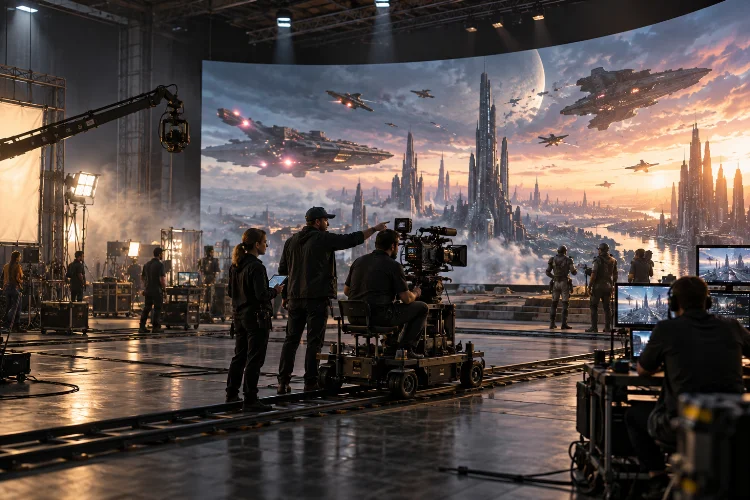
Imagine filming a sunrise in the desert, then switching to a rain-soaked futuristic city without moving the crew to another location.
That sounds like a producer’s dream, right? LED volume stages make that kind of flexibility possible, but only when the technology fits into the production plan from day one.
Integrating LED volume stages into film production pipelines is about much more than putting a giant screen behind the actors.
It brings virtual environments, real-time rendering, camera tracking, lighting, cinematography, and visual effects into the same room. Suddenly, choices that traditionally happened in post-production need to be made much earlier.
That shift creates exciting opportunities. Directors can judge backgrounds while shooting, actors can respond to visible surroundings, and cinematographers can capture practical reflections from digital scenery.
It also introduces unfamiliar deadlines, technical dependencies, and expensive ways to lose an afternoon.
The good news? You don’t need to rebuild your entire studio around a volume. You need a sensible workflow, the right specialists, and a clear understanding of which scenes genuinely benefit. Here’s how to make the technology work for the film rather than the other way around.
1. Decide Where LED Volumes Actually Add Value
Start with the shots, not the equipment
An LED volume is a stage surrounded partly or extensively by high-performance LED panels showing digital environments. With in-camera visual effects (ICVFX), a tracked camera sees a perspective-correct background rendered in real time.
The surrounding imagery can also provide lighting and reflections on actors, costumes, and physical props.
That’s incredibly useful for a dialogue scene inside a moving vehicle, a spaceship window, or a rooftop with a difficult skyline.
It’s less useful when performers must run across an enormous landscape, interact with lots of distant objects, or shoot complex angles that exceed the stage’s physical boundaries.
Break the screenplay into sequences, then compare location shooting, physical sets, green screen, traditional VFX, and LED-stage approaches. Don’t label an entire movie “virtual production” before the shot list supports it. A hybrid plan often beats an all-or-nothing decision.
Choose between 2D plates and 3D environments
Not every LED background needs a fully navigable digital world. A carefully captured plate can work beautifully for a relatively fixed camera angle or a vehicle interior.
When the camera travels sideways and foreground-to-background parallax matters, a tracked 3D environment usually offers far more convincing perspective changes.
As a practical example, imagine a six-page train-car scene with changing countryside outside the windows.
Pre-shot plates may be sufficient for tight coverage, while wider dolly moves could justify real-time scenery. Deciding that distinction during breakdown saves artists from building assets nobody will see.
2. Move Virtual Environment Design Into Preproduction
Give the virtual art department real deadlines
Traditional filmmaking can leave certain digital backgrounds until months after principal photography. LED-based production flips that assumption: backgrounds visible in camera must be prepared, reviewed, and technically stable before the shoot.
Your virtual art department (VAD) therefore becomes a close partner of production design, cinematography, and the VFX supervisor.
Begin with storyboards and technical previs. Agree on geography, time of day, important architectural features, practical-set boundaries, and the camera positions each scene needs. Build simple blockouts first, then improve detail only where the lens will actually see it.
Use clear asset milestones such as layout approved, lighting approved, performance tested, and camera-ready. Lock essential versions ahead of the shoot while allowing controlled changes on stage.
Otherwise, “We’ll fix the background tomorrow” can become the virtual-production equivalent of rebuilding a location during the lunch break.
Test the actual camera angles
Virtual scouting lets directors and cinematographers explore a digital set before entering the volume. It’s a chance to identify awkward sightlines, missing set extensions, unwanted reflections, and digital details that look great in a still image but collapse during a camera move.
Plan a techvis session that combines lens choices, camera height, tracking range, physical set dimensions, and LED-wall geometry.
The goal isn’t to remove spontaneity. It’s to give the crew enough information to improvise without discovering that an entire wall has slipped into the wrong perspective.
3. Connect Camera Tracking, Rendering, and LED Hardware
Make the pipeline behave like one synchronized system
The core setup typically combines cinema cameras, lens calibration, camera tracking, a real-time engine, rendering computers, LED processors, and the panels themselves.
Epic Games’ Unreal Engine documentation describes how nDisplay coordinates rendering, while Live Link can bring tracking data into the virtual scene.
In a tracked setup, the engine renders an inner frustum: the portion of the virtual environment seen from the production camera’s perspective. The outer frustum provides surrounding imagery that supports light and reflections.
When the camera moves, the inner view must update with it; otherwise, the background seems to slide instead of existing in a believable world.
Record lens focal length, focus, distortion, and relevant offsets rather than assuming the digital camera automatically matches the real one.
Misaligned tracking or an incorrect nodal offset can make objects drift, especially during close, precise camera movement. A short rehearsal with the intended lens is worth more than a spectacular demo using different gear.
Fix timing before the first take
Genlock, timecode, processor behavior, render latency, and camera shutter settings all affect what the sensor records. If these components don’t cooperate, the crew may see tearing, rolling bands, or backgrounds that lag behind camera movement.
Brompton Technology’s technical guidance distinguishes synchronization problems from other artifacts such as moiré.
That matters because a display can look perfectly fine to the naked eye yet produce ugly patterns through the cinema camera. Test the exact combination of panels, lenses, movement, focus distance, shutter settings, and frame rate planned for the sequence.
Also plan backup configurations. If live rendering fails, can the production shoot a simplified plate, adjust coverage, or switch to a conventional VFX method? A sensible fallback turns a technical problem into a schedule adjustment instead of a full shutdown.
4. Treat Lighting and Color as a Shared Workflow
Match the physical and digital worlds
One of the biggest attractions of LED filmmaking is interactive light. A digital sunset can warm an actor’s face, while animated city signs create reflections in a car’s windows.
Still, the wall can’t replace every light fixture. Skin tones, directional shadows, highlights, and the shape of practical objects often require additional controlled lighting.
The cinematographer, gaffer, color scientist, and VAD should plan the look together. Decide which illumination comes from the wall, which comes from practical fixtures, and where negative fill or diffusion is needed. For shiny costumes and glass props, rehearse reflections before the scene is fully dressed.
Calibrate for the camera, not just your eyes
A pretty image on the wall isn’t proof that it will photograph correctly. Panel calibration, brightness, spectral differences, exposure, white balance, and color transforms can all influence how the camera interprets the background and the light it casts.
Sony’s virtual production resources describe camera-to-display calibration, while Netflix’s OpenVPCal provides an open-source approach to LED-wall color calibration.
The Academy Color Encoding System (ACES) offers a framework for managing color across cameras, imaging tools, and finishing, although the team still has to configure and validate its particular transforms.
Schedule a camera test with flesh tones, neutral references, dark scenes, saturated colors, and reflective surfaces.
Document the approved look-up tables and monitor settings, and keep the same color-management decisions available to post-production. Good calbration is less exciting than a beautiful sunset, but it helps that sunset survive the edit.
5. Redesign Stage Operations Around Collaboration
Define who makes the call
A successful LED stage needs more than a talented visual-effects operator parked behind a monitor.
The director, cinematographer, production designer, VFX supervisor, virtual production supervisor, tracking team, LED technicians, and assistant camera crew all influence the captured image.
Decide who can approve environment changes, who owns tracking and lens data, and who has authority to stop for technical troubleshooting.
Establish one communication channel for shot changes. If the director changes lens and the VAD changes virtual sunlight simultanously, someone must confirm that the combined result remains technically sound.
Run a prelight and camera rehearsal with actors or stand-ins, then document working setups.
Save approved environment states and camera settings so the team can return to them between takes. Production becomes much smoother when resets are repeatable rather than dependent on somebody remembering which slider they moved.
Keep the physical set honest
The LED wall is an image surface, not an unlimited location. Its curvature, height, viewing angles, available floor space, and distance from talent can determine whether the illusion works.
Physical foreground scenery often hides the join between stage floor and virtual landscape.
If a character leans against a digital railing, they’ll still need a real surface that matches its position. Similarly, rain, dust, vehicles, and large camera rigs may introduce safety and equipment concerns.
An LED volume doesn’t remove location-style planning; it relocates much of that planning into a controlled enviroment.
6. Budget the Entire Pipeline, Not Just Stage Rental
Compare complete sequence costs
An LED stage may reduce location travel, weather exposure, some set construction, and certain compositing tasks. But the saving isn’t automatic.
Digital asset creation, stage rental, tracking, render hardware, specialist crew, testing days, and prelight can create a large upfront commitment.
Imagine a fictional production considering three nights of rooftop dialogue. The location version involves permits, street control, transport, lighting equipment, and possible weather delays.
The volume version substitutes stage fees, a city environment, foreground construction, technical calibration, and a virtual production crew.
Price both approaches for the same finished sequence, including post work, contingency, and the likelihood of extra days.
A cheap-looking stage rate may hide expensive environment revisions. Conversely, an asset used across five episodes can become more economical once development costs are spread across multiple scenes.
Build approval gates that protect shooting days
Add a readiness review before committing to expensive stage time. Check asset quality, approved framing, performance under load, hardware availability, color sign-off, and the status of physical props.
The production manager should know whether a scene is ready, ready with restrictions, or not ready.
Track practical measures such as approved shots completed per stage day, hours lost to tracking resets, last-minute asset changes, and the proportion of backgrounds needing major fixes after filming.
These metrics help teams refine budgets without pretending every type of film will have the same return on investment.
7. Plan Editorial and Post-Production Before the Shoot
Capture useful metadata with the picture
“In-camera final” doesn’t always mean “no post-production.” Editorial may reveal a distracting seam, an unwanted reflection, or a shot that needs reframing.
Teams also need consistent color, clean plates when appropriate, and access to the elements required for any subsequent VFX repair.
Coordinate deliverables before principal photography. Alongside camera originals, preserve the relevant virtual environment versions, camera and lens metadata, tracking data where practical, color transforms, and shot notes.
Record what was captured on the volume versus what still needs conventional compositing.
A quick review of dailies can identify recurring problems while the stage setup still exists. If a background requires adjustment, the crew may be able to resolve it during the current booking rather than attempt a difficult reconstruction later.
That feedback loop is a major reason editorial should be connected to virtual production operations.
Create a reusable studio knowledge base
After each LED sequence, document the settings that worked, the ones that didn’t, and the costs nobody anticipated. Organize environments, lens profiles, tests, and stage diagrams so future productions can locate them without rebuilding everything from scratch.
Don’t assume every digital asset can be reused freely: licensing, vendor contracts, and intellectual-property ownership still matter. Once those permissions are sorted, a well-maintained asset library can make sequels, episodic work, and repeating locations easier to accomodate.
LED volume stages can reshape film production by bringing digital scenery, lighting, and real-time creative decisions directly onto the set. Their real advantage, though, comes from coordination – not screen size.
Teams that plan environments early, calibrate cameras carefully, clarify responsibilities, and preserve reliable metadata are better positioned to capture convincing results without unnecessary disruption.
The smartest approach is usually selective. Use LED stages where controlled lighting, repeatable backgrounds, and in-camera realism serve the story; keep location shoots, practical sets, and conventional VFX where they remain the better choice.
Ready to experiment? Choose one suitable sequence, build a small proof of concept, and compare the results with your usual production method. A focused test can teach your team more than an expensive leap into an untested pipeline.