

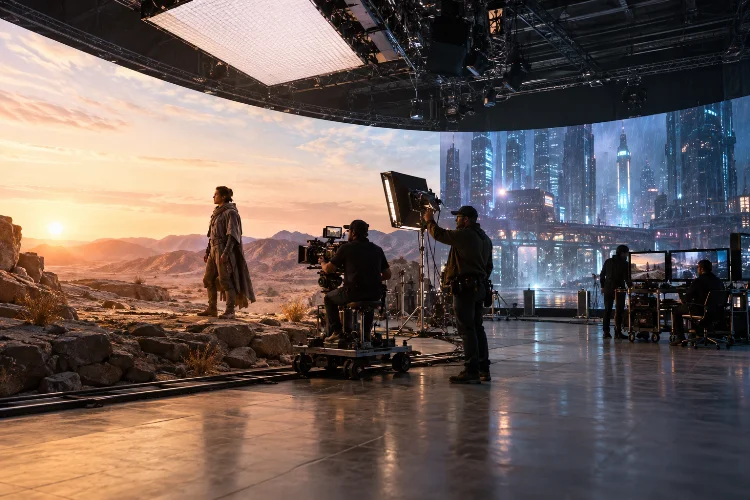
Imagine filming a massive spaceship battle, a futuristic city chase, or a dramatic desert sequence without actually traveling to another planet, building an entire city, or waiting for perfect weather.
Sounds pretty convenient, right? That’s exactly where modern filmmaking technology starts getting interesting.
Virtual production workflows for complex feature film scenes are changing how filmmakers plan, capture, and finish visually ambitious sequences.
Instead of leaving every digital effect until post-production, directors can combine physical sets, real-time 3D environments, camera tracking, and LED displays to make important creative decisions much earlier.
But here’s the catch: impressive technology doesn’t automatically create a smooth production. Poor preparation can turn a sophisticated LED stage into an expensive problem, especially when complicated camera moves, interactive lighting, and multiple visual effects are involved.
A successful workflow requires much more than powerful computers and beautiful digital backgrounds. It needs collaboration between creative departments, careful technical testing, and a realistic plan for each shot.
This guide explores how filmmakers can organize the entire process, from initial scene planning to final delivery, while keeping storytelling at the center of everything.
1. Understanding Virtual Production in Complex Feature Film Scenes
What Makes Virtual Production Different?
Traditional filmmaking often follows a relatively linear process. Teams develop a script, build locations, shoot footage, and then send complicated visual effects work into post-production.
Virtual production changes that relationship by allowing filmmakers to develop and visualize digital elements while preparing physical production. Using real-time rendering technology, teams can explore environments, experiment with camera movements, and preview visual effects before principal photography begins.
According to Unreal Engine’s explanation of virtual production, the technology covers several processes, including previsualization, virtual scouting, performance capture, and in-camera visual effects.
That distinction matters because virtual filmmaking isn’t limited to LED walls. A production can benefit from digital visualization without ever shooting inside an LED volume.
Why Complex Scenes Require Specialized Workflows
Consider a science-fiction feature involving a moving vehicle surrounded by futuristic buildings, atmospheric effects, and intense action. Shooting everything physically could require expensive locations, extensive set construction, and complicated safety arrangements.
A virtual production approach might combine a practical vehicle interior with a digital city displayed behind its windows. Interactive lights could simulate passing traffic, while camera tracking maintains the correct relationship between the foreground actors and virtual background.
However, the technology must support the scene’s dramatic purpose. If the audience should feel trapped inside a speeding vehicle, convincing performances and believable movement matter just as much as the digital skyline.
The real advantage is creative control. Directors can adjust environmental details while maintaining continuity, although those adjustments still depend on the capabilities of the chosen production setup.
2. Pre-Production Planning: Building the Workflow Before the Set
Break Down Complex Scenes Into Manageable Elements
The most successful digital filmmaking process starts with an honest evaluation of the script. Before selecting software or renting equipment, producers should identify which visual elements are practical, computer-generated, or potentially suitable for in-camera effects.
Imagine a 14-shot action sequence inside a futuristic train. Five shots might benefit from LED backgrounds, three could use conventional practical sets, and six might need greenscreen or conventional post-production compositing.
This hypothetical breakdown helps prevent the common mistake of applying one production method to every shot. Different techniques can work together within the same scene.
Each shot should also include information about camera movement, actor interaction, lighting changes, digital asset requirements, and expected post-production work.
Use Previsualization and Technical Visualization
Previsualization, commonly called previs, lets filmmakers create rough digital versions of scenes before expensive shooting begins. These animations establish framing, blocking, action timing, and the relationship between physical and virtual elements.
Technical visualization, or techvis, takes the process further. It examines practical details such as crane clearance, lens selection, camera positions, and the dimensions of a stage.
For example, a dramatic camera move might look fantastic in previs but become impossible when the physical stage is smaller than the virtual enviroment. Discovering that limitation during planning is far better than discovering it after an entire crew arrives.
Virtual scouting also allows production designers and cinematographers to explore digital locations together. Unreal Engine’s Virtual Production Field Guide overview describes how early visualization helps departments coordinate creative and technical decisions.
The important takeaway is simple: digital preparation should answer practical questions, not just produce impressive concept images.
3. Digital Environment Creation and Real-Time Asset Optimization
Build Digital Sets for the Camera
Creating a realistic virtual environment isn’t simply about producing detailed 3D models. The environment must look believable from the actual camera angles, under the intended lighting conditions, and at the required rendering speed.
Artists typically construct digital locations using 3D modeling, photogrammetry, procedural tools, texture libraries, and real-time engines such as Unreal Engine.
For a futuristic city sequence, the digital art team might develop buildings, streets, atmospheric effects, distant landmarks, and animated traffic. Yet not every object needs movie-poster levels of detail.
Background buildings that appear far from the camera can often use simplified geometry or optimized textures. Objects close to the lens may require better materials, careful proportions, and more detailed surfaces.
This approach helps balance visual fidelity against computational demands.
Optimize Assets Before Production
Real-time rendering means the system must produce frames quickly enough to support the camera’s capture workflow. Heavy geometry, expensive lighting calculations, oversized textures, and complicated simulations can create performance problems.
Artists should test demanding camera angles early, monitor rendering performance, and establish approved settings for stage operation. An asset that looks perfect on a workstation may behave differently when multiple render nodes are driving large LED displays.
Optimization might involve reducing unnecessary geometry, controlling texture memory, simplifying particle effects, or using alternative methods for distant scenery.
Version management matters too. When different artists modify the same virtual scene, approved assets and scene configurations need clear names, owners, and update procedures.
Establish Creative Approval Milestones
A practical pipeline should include reviews for layout, lighting, material quality, camera framing, and final stage readiness.
These reviews help avoid expensive last-minute requests, such as rebuilding an entire skyline because the director wants a completely different angle.
Some flexibility is one of the technology’s biggest advantages, but that doesn’t mean every change is free. A minor lighting adjustment may take minutes, while redesigning complex geometry could require substantial additional work.
Good planning creates room for creativity without turning every shooting day into a technical experiment.
4. LED Volume Integration, Camera Tracking, and Color Management
How LED Volumes Create Believable Environments
LED volumes use large display surfaces to present virtual scenery behind practical sets and performers. When connected to real-time rendering systems, the displayed perspective can respond to a tracked camera’s position.
This creates parallax, allowing digital objects to shift naturally as the camera moves.
The technology is often described as in-camera visual effects, or ICVFX. Epic Games’ In-Camera VFX documentation explains how LED lighting, camera tracking, and real-time rendering work together.
The system typically renders a perspective-correct region, often called the inner frustum, for the main camera. Surrounding imagery can provide lighting and reflections without necessarily matching that camera’s exact perspective.
This setup works particularly well for controlled environments, vehicle interiors, and sequences requiring consistent backgrounds.
Synchronization and Tracking Accuracy
Camera tracking connects real camera movement to the digital environment. Depending on the setup, optical tracking systems, markers, lens metadata, and other sensors help reproduce camera position and orientation.
Small tracking errors can create noticeable background movement, especially when the camera moves quickly or passes near virtual objects.
Synchronization presents another challenge. Cameras, LED processors, and rendering systems must operate with compatible timing to avoid flickering, scanning artifacts, or inconsistent frames.
Epic’s In-Camera VFX Quick Start demonstrates how render nodes, tracking connections, and the inner and outer frustums fit into a working setup.
For complex action scenes, calibration and tracking tests should happen before performers begin demanding physical sequences.
Managing Color, Moiré, and Reflections
One surprisingly tricky issue is making LED images look correct through the actual cinema camera.
Displays and sensors reproduce colors differently, which can cause mismatches between the digital background, practical objects, and actors’ skin tones.
A color-managed pipeline using tools such as OpenColorIO helps coordinate transformations between rendering software, LED displays, camera monitoring, and post-production. However, accurate results still require practical testing and camera-specific calibration.
Moiré is another potential issue. These distracting patterns can appear when the camera sensor interacts with the repeating pixel structure of LED panels.
ARRI’s Virtual Production FAQ identifies synchronization, color reproduction, and moiré as major technical concerns.
The solution depends on the exact camera, lens, aperture, screen, and shooting distance. That’s why a proper camera test matters more than relying on a universal calibaration setting.
5. Managing Actors, Lighting, and Complex Camera Movements
Keep Performances at the Center
One major benefit of virtual production is that performers can often see the world surrounding them rather than imagining everything against a green backdrop.
An actor inside a spacecraft cockpit can look through the windows and see a digital landscape. This may provide useful visual cues for reactions, eyelines, and timing.
Still, the scene needs an effective physical setup. Props, practical set pieces, movement platforms, and believable lighting help actors connect naturally with their surroundings.
A digital desert doesn’t automatically make a stationary vehicle feel like it’s crossing uneven terrain. Physical motion, camera techniques, sound design, and performance must work together.
Design Lighting as a Shared System
LED walls can provide environmental illumination and reflections, making them particularly useful for reflective objects, glass, and vehicle interiors.
However, the screens may not provide enough brightness, directionality, or suitable spectral output for every lighting situation. Cinematographers often supplement them with conventional fixtures to shape faces, create hard sunlight, or simulate moving light sources.
For example, a nighttime driving scene could use LED imagery for city reflections while programmable fixtures create sharper flashes from passing streetlights.
The director of photography, gaffer, digital environment artists, and virtual production supervisor should coordinate these decisions before shooting.
Rehearse Difficult Movements
Complex scenes often involve moving cameras, actors, vehicles, practical effects, and digital elements simultaneously.
A proper technical reherasal should check camera tracking stability, physical clearance, performance timing, and the visibility of LED panel boundaries.
Multiple-camera setups require particular care because one perspective-correct background may not work equally well for cameras in different positions.
In some situations, the production may need separate passes, adjusted framing, or a hybrid compositing solution.
Technology should adapt to the shot’s needs rather than forcing every creative decision into a single technical configuration.
6. On-Set Operations and Real-Time Production Coordination
Create a Clear Communication Structure
A virtual production stage brings together departments that traditionally work at different points in the filmmaking process.
The director, cinematographer, production designer, visual effects supervisor, real-time engine operators, and technical crew must communicate effectively during principal photography.
Having clear responsibilities prevents confusion. The director approves creative changes, the cinematographer oversees photographic decisions, and designated technical specialists manage rendering, tracking, and display systems.
Before each setup, the team should confirm the correct digital scene version, lighting state, camera parameters, and recording settings.
This might sound administrative, but complicated shoots can lose valuable time when nobody knows which version of a digital background is currently active.
Establish a Reliable Shooting Routine
A typical on-set workflow begins with loading the approved environment and verifying camera tracking. The team then checks synchronization, lighting, exposure, focus, and color consistency through the production camera.
Next comes blocking and a technical run-through. Only after the system performs reliably should the crew proceed with demanding takes.
When something looks wrong, troubleshooting should be systematic. A moving background might indicate tracking trouble, while unusual banding could point to synchronization or exposure-related issues.
Crew members should document problems and fixes so the same issue doesn’t consume time during later setups.
Capture More Than the Final Image
Even when the goal is to record finished visual effects in-camera, productions should preserve useful technical information.
That includes original camera footage, lens and tracking metadata where available, approved scene versions, and notes about changes made during filming.
Depending on the shot, teams may also capture clean plates, alternate backgrounds, reference photographs, or additional visual effects elements.
Industrial Light & Magic’s work on The Mandalorian helped demonstrate how real-time environments and practical cinematography can operate together.
Importantly, the production still involved extensive traditional visual effects work. LED technology didn’t eliminate post-production; it changed which creative and technical tasks happened on set.
7. Post-Production, Budget Planning, and Workflow Improvement
Plan Post-Production Before Filming
One common misconception is that capturing digital backgrounds in-camera removes the need for post-production.
In reality, some shots may be finished almost entirely on set, while others require cleanup, compositing, digital extensions, animation, or additional effects.
A realistic workflow assigns an expected finishing method to every shot during preparation.
For example, a dialogue scene filmed against an LED cityscape might require only routine color grading and minor cleanup. A complicated crash sequence could still require substantial simulation, compositing, and digital replacement.
This distinction helps editors and VFX teams understand what they will recieve rather than discovering unexpected limitations after photography ends.
Evaluate Costs Across the Entire Production
LED stages can reduce certain expenses associated with location travel, set construction, weather delays, and repeated background setups.
However, they introduce other costs, including stage rental, real-time environment creation, specialist crew, tracking systems, calibration, testing, and technical support.
The financial question shouldn’t simply be whether renting an LED volume is cheaper than hiring a conventional studio.
Instead, compare the total expected expense of competing production methods for the same sequence, including preparation and post-production.
A hypothetical feature might discover that a controlled vehicle sequence becomes more efficient through LED cinematography because the team can capture several city locations during one stage booking.
Another production could find that straightforward location photography is more practical for its needs.
The right answer depends on creative demands, shot count, schedule, available resources, and how much digital work remains after filming.
Review Performance and Refine the Pipeline
At the end of each complex sequence, producers should evaluate what actually worked.
Useful measurements include setup duration, technical interruptions, approved shots per day, rendering stability, and the amount of unexpected post-production work.
A particularly helpful comparison is planned versus actual finishing effort. If supposedly final-pixel shots regularly require extensive corrections, the team may need better early calibration, revised asset standards, or more realistic shot selection.
These reviews help turn the lessons from one difficult scene into improvements for the rest of the feature.
As virtual production tools become more accessible, effective workflows will remain more valuable than simply adopting the newest equipment.
Virtual production is opening exciting possibilities for filmmakers who want to create visually ambitious feature films without depending entirely on traditional location shooting or lengthy visual effects pipelines.
But successful results require more than LED screens and sophisticated software. Careful previsualization, optimized digital environments, accurate camera tracking, color management, and strong communication between departments are essential to a dependable workflow.
Just as importantly, filmmakers must understand when virtual techniques genuinely improve a scene and when conventional methods make more sense.
The smartest approach combines creative ambition with realistic planning, thorough technical testing, and flexible post-production strategies.
If you’re developing a complex feature film, start by breaking down one challenging sequence, comparing available production methods, and testing the most demanding shot early.
A well-designed workflow can transform an intimidating visual concept into a manageable, creative, and genuinely cinematic experience.